3Shape TRIOS 6: Why We Upgraded from TRIOS 3
David Drew explains why The Dental Barns upgraded to 3Shape TRIOS 6: clearer 3D scans, Dx Plus, patient communication and practical tips from daily use.

By David Drew, Co-Founder of The Dental Barns
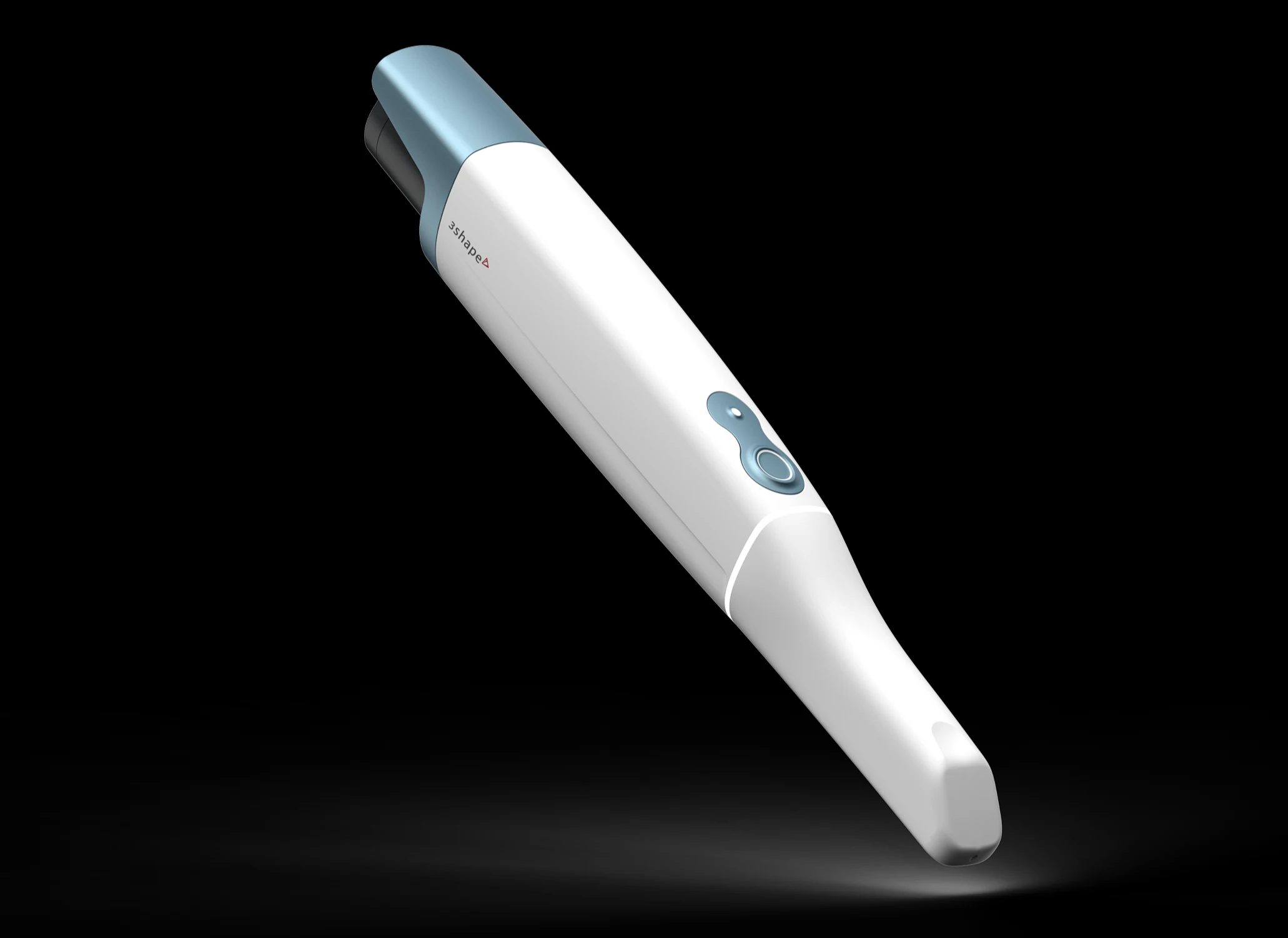
We opened The Dental Barns in Lichfield with a 3Shape TRIOS 3 intraoral scanner. We loved it: reliable, fast and a very good way to help patients understand their teeth. It still is. So why invest around £20,000 in a 3Shape TRIOS 6?
Scanning has become part of our everyday care, from check-ups to planning more complex restorations. We wanted to make that record more useful, and the conversation around it clearer. The combination of better detail, Dx Plus and a patient app made this an upgrade we felt we had to consider.
Why did we choose 3Shape in the first place?
When we were opening, freedom of choice mattered to us. If Invisalign was right for a patient, we wanted that option. If Spark was more suitable, we wanted that choice too. We did not want our scanner purchase to decide the treatment system for us.
TRIOS 3 gave us the flexibility we were looking for, with connections to different laboratories and treatment partners through 3Shape Unite. It also proved straightforward to use day after day. That experience gave us confidence in staying with 3Shape.
What does TRIOS 6 bring to your appointment?
An intraoral scanner builds a three-dimensional model as we move a small scanning tip around your mouth. We can turn that model on screen and look at tooth positions, visible tooth surfaces and the shape of the gums together. For many treatments, it also gives the laboratory a digital impression to work from.
TRIOS 6 adds high-definition scanning, giving us more detail to inspect and share. That matters when the team is planning crowns or more complex restorative work, where a clear record of the prepared tooth and surrounding teeth is valuable.
It is wireless too. I will admit that I am usually a fan of wires: I like a connection I can see. With a little care over the setup, though, wireless scanning has worked very reliably for us and gives the team more freedom around the chair.
What can Dx Plus help us see?
The biggest reason to look seriously at the upgrade was 3Shape Dx Plus. This software uses AI to highlight areas on TRIOS 6 scans for the dentist to review, including:
- Surface caries: areas that may show tooth decay.
- Tooth wear: changes to the tooth surface that deserve a closer look.
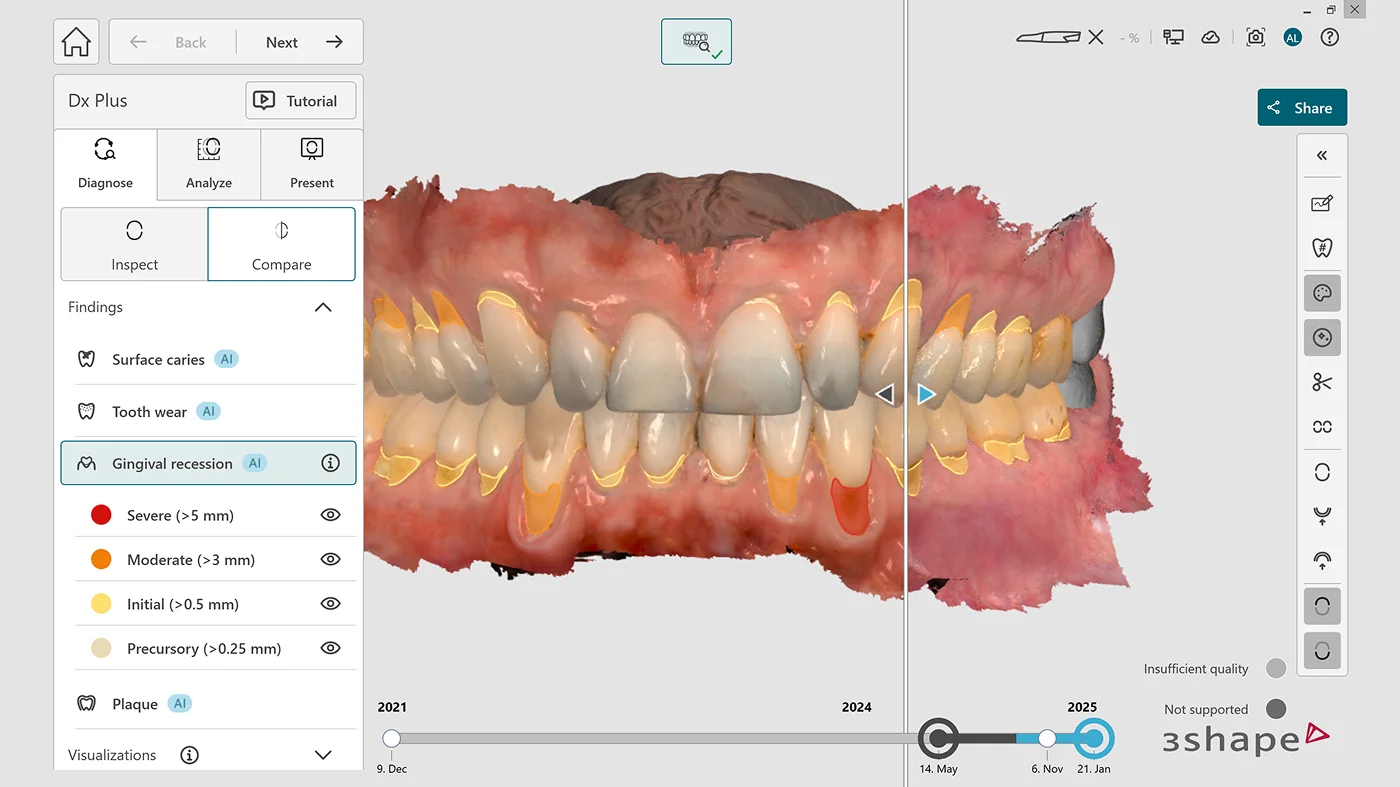
- Gum recession: where the gum margin has moved back.
- Plaque: areas that can help guide a conversation about cleaning.
Dx Plus also offers a view to help assess decay between teeth, called proximal caries. That particular view is not AI detection. The dentist interprets the findings alongside your examination and any X-rays needed; a coloured highlight does not, by itself, mean you need treatment.
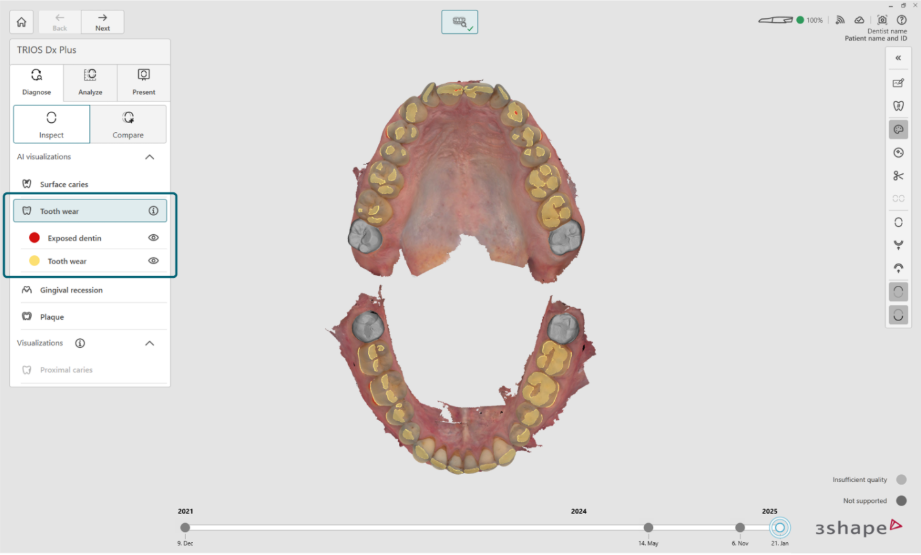
For me, the value is being able to explain something clearly. Showing a patient the area we are discussing gives them a much better starting point for questions than a description alone.
Why scan at every check-up?
We scan at every check-up because a single record becomes more valuable when you can compare it with the next one. Has a tooth moved? Has a worn area changed? Does the gum margin look different?
The comparison and measurement tools in Dx let the clinical team review scans from different visits, rather than rely on memory. They help us explain changes, and can also give us something positive to discuss when things appear stable.
A scan records visible surfaces. Gum-health checks and the rest of your examination still matter, but this adds a detailed, repeatable visual record that we can look through with you.
Can you look at your scan at home?
The DentalHealth app was another attraction. With Dx Plus, we can share scans and visual findings to the app, so you can revisit them after the appointment alongside information about looking after your teeth.
It is easy to forget a detail once you leave the chair. Being able to look again, or come back with a question, helps the conversation carry on at home.


Our Signature Assessment gives us time to understand your dental health, look through your scan together and answer your questions.
How does it fit into our Doctor Station?
Both our TRIOS 6 and TRIOS 3 are connected to the Doctor Station, the integrated setup we built around the dental chair. Switching between them is very straightforward. The live scan appears on both of our 65-inch Samsung The Frame 4K screens, so patients can follow it as it takes shape.
Seeing the scan develop helps people stay involved and understand how we need them to position their mouth. Afterwards, we can turn the model, zoom in and talk it through together. With three screens available to the dentist and nurse, they can also choose a comfortable viewing position that suits where they are working.

Our scanning setup, at a glance
- Scanner: 3Shape TRIOS 6, a wireless intraoral scanner weighing 308g including the battery.
- Detail: high-definition colour scans, with ScanAssist technology to help align the images as we scan.
- Software: 3Shape Unite for the workflow, with Dx Plus for AI-assisted review and sharing through DentalHealth. Dx Plus is a separate software subscription.
- Second scanner: our original TRIOS 3, connected to the same Doctor Station for easy switching, continuity and compatible treatment workflows.
Doctor Station specification
- Workstation: Dell Precision 5860 tower.
- Processor: Intel Xeon w7-2495X.
- Memory: 64GB RAM.
- Storage: 1TB SSD.
- Graphics: NVIDIA RTX A4000, which handles our everyday scanning well.
- Patient displays: two Samsung The Frame 65-inch 4K screens.
- Touchscreen: Dell 24-inch touchscreen interface.
- Controls: Elgato Stream Deck controls for the clinician and nurse.
What happened to the supplied laptops?
One Dell Precision 7680 laptop came with each scanner, both with NVIDIA RTX 3500 Ada Generation Laptop GPUs. We do our scanning through the Doctor Station, so we do not use these laptops for scanning.
They certainly have not gone to waste. Both are being put to good use for our wider technology work, including projects with ChatGPT and Codex. I enjoy that side of running a practice too.
A few practical notes for dentists
The everyday details make a difference. These are some of the things we have found useful:
- No routine calibration: TRIOS 6 is calibration-free, removing a regular setup task. We use autoclavable tips, with single-use TRIOS Ready Tips available when needed.
- Keep batteries in rotation: we have three batteries and keep the spares charging. A busy scanning day does get through them, so having a charged replacement ready matters.
- Give the wireless adapter some space: we positioned ours on a USB extension cable, away from other potential sources of interference. That small change has given us a very dependable scanning connection.
- Look after the computer too: we restart our systems weekly. We occasionally reach graphics-memory or RAM limits, but otherwise the setup handles our workload well. That is our experience with this configuration; a scanning computer still needs to meet 3Shape’s current requirements.
3Shape’s support has been excellent in our experience. When we have needed help, the team has been able to connect remotely quickly and work through the issue with us. That kind of practical support matters when a piece of equipment is used throughout the day.
Why have we kept our TRIOS 3?
Continuity is high on my list. Neither scanner has failed us, but keeping both connected to the Doctor Station means a backup is already in the right place if one ever develops a problem. Switching is straightforward, giving us another option for compatible scanning work without having to set up a different computer.
The TRIOS 3 also still has a specific job: we used it for an Invisalign case this week.
There is an important compatibility distinction here. 3Shape currently lists TRIOS 3 as its scanner that can send scans for Invisalign; TRIOS 6 does not have that integration. Keeping both helps us preserve the treatment flexibility that mattered when we first opened.
Was it worth around £20,000?
For us, yes. Our TRIOS 6 investment was around £20,000, and it is a tool we use throughout the working week. We value the detail for restorative planning, the record we build over time and, above all, how much easier it makes a conversation with a patient.
As with our Fujifilm GFX100 II camera, we want the equipment to support the care and attention we put into everything else. Patients should be able to understand what we are seeing, ask questions and feel involved in the choices ahead of them. This scanner helps us do that every day.
Scanner and software demonstration images: 3Shape. Doctor Station photograph: The Dental Barns.
At The Dental Barns in Lichfield, we’ve reimagined what private dentistry can feel like. Our patients choose us not just for results, but for the calm, luxurious experience that surrounds every visit. From the moment you arrive, you’ll notice the difference — a spa-like environment, thoughtful design, and a team that takes time to understand you. Our exclusive VIP approach means appointments are unhurried, comfort is prioritised, and advanced digital technology ensures precision in every treatment.
Whether you visit for Invisalign, composite bonding, veneers, or gentle hygiene therapy, every detail is considered — from the heated anaesthetic to the aromatherapy scents that make our space feel like home. Transparency, trust, and technology underpin everything we do, allowing patients to relax knowing they’re in expert hands.
Our Why VIP philosophy is simple: world-class dentistry, delivered with warmth, calm, and integrity. It’s why so many of our patients travel from across Staffordshire and the West Midlands to experience The Dental Barns difference.